
What Is a Patient Monitor? Understanding Patient Monitoring from the Hospital Ward to the ICU
Hello from Bionet! 😃
If you’ve ever visited an emergency department or intensive care unit, you’ve probably noticed a bedside monitor displaying ECG waveforms and a changing set of numbers.
These devices are patient monitors. They measure and display vital signs and other physiological data, helping healthcare professionals keep track of a patient’s condition and recognize changes over time.
In this post, we’ll explore what patient monitors do, how monitoring needs differ across clinical settings, and how Bionet’s monitoring solutions support patient care.🤓
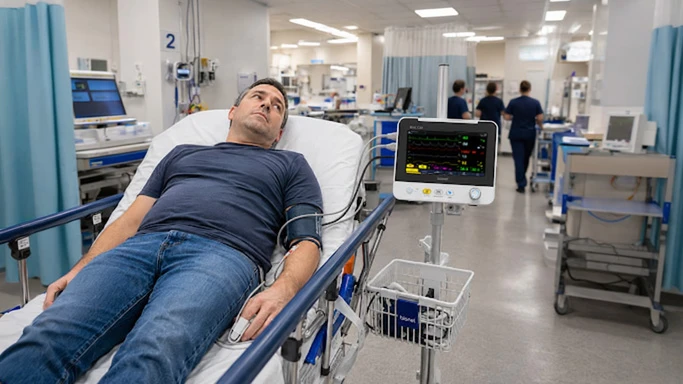
From emergency departments and general hospital wards to operating rooms, intensive care units, and patient transport, monitoring plays an essential role in helping clinicians stay informed about a patient’s condition.
What Does a Patient Monitor Measure?

One of the main advantages of a patient monitor is the ability to view multiple physiological parameters together on a single screen.
Common monitoring parameters include:
ECG: The heart’s electrical activity and heart rate
SpO₂: Peripheral oxygen saturation
NIBP: Noninvasive blood pressure
RESP: Respiratory rate
Temperature: Body temperature
Settings that require more intensive monitoring, such as ICUs and operating rooms, may also call for additional parameters. These can include invasive blood pressure (IBP), end-tidal carbon dioxide (EtCO₂), multigas monitoring, cardiac output, bispectral index (BIS), and neuromuscular transmission (NMT).
When choosing a patient monitor, the first question should be which patients will be monitored, and in what clinical setting? The number of available parameters is only one part of the decision.
Different Care Settings Have Different Monitoring Needs
Monitoring a patient during emergency transport presents different demands from monitoring a critically ill patient over an extended period in the ICU.
During transport and bedside triage, portability and the ability to begin monitoring quickly are key priorities. On general hospital wards, ease of use and efficient patient monitoring are especially valuable.
In ICUs and operating rooms, clinicians often need more advanced monitoring capabilities and flexible parameter configurations to support higher levels of care.
Bionet offers patient monitoring solutions for a range of clinical environments, from emergency medical services (EMS) and patient transport to general wards, step-down units, operating rooms, and ICUs.
BM1: Compact Monitoring for Care on the Move


The BM1 is a compact multiparameter patient monitor with a 7-inch display.
Its portable design supports use on general wards, during patient transport, and in bedside monitoring settings. Wi-Fi connectivity also enables connection to a central monitoring system.
For care environments where space is limited or patients need to be moved, the BM1 provides a practical way to keep essential physiological information in view.
Brio X Series: From General Wards to Higher-Acuity Care
As patient care needs change, monitoring capabilities may need to expand.
Bionet’s Brio X Series is a premium lineup of patient monitors with multitouch displays, available in three screen sizes: the 8-inch Brio X30, 12.1-inch Brio X50, and 15.6-inch Brio X70.
Brio X30
The Brio X30 combines a compact design with an 8-inch multitouch display, flexible modular parameter options, and smart alarm features.
It is designed for use across a range of clinical settings, including general wards and step-down units.

Brio X50
The Brio X50 features a 12.1-inch multitouch display and supports a range of modules, including multigas, BIS, and NMT.
Its configuration options support both routine patient monitoring and more specialized applications, including operating rooms and anesthesia care.

Brio X70
The Brio X70 is Bionet’s high-acuity patient monitor, featuring a 15.6-inch multitouch display and a fully modular design.
Advanced parameter options, including cardiac output, BIS, and multigas monitoring, support settings that require more intensive monitoring, such as the ICU.

Connectivity: An Essential Part of Patient Monitoring

Connectivity is an increasingly important part of patient monitoring.
In addition to reviewing information at individual bedsides, clinicians can use central monitoring systems to view data from multiple patients in one place. This makes central monitoring an important component of a hospital’s monitoring infrastructure.
Bionet’s BM Central Pro enables centralized monitoring of connected devices, including the Brio X Series and BM1, from a central nursing station.
It supports connections to up to 64 patient monitors, with support for up to 16 wireless monitor connections.
An HL7 interface also supports data exchange with hospital information systems (HIS) and electronic medical record (EMR) systems, helping bring connected patient monitor data into the hospital’s broader information workflow.
Five Things to Consider When Choosing a Patient Monitor
Screen size and available parameters matter, but choosing a patient monitor also means considering how it will fit into everyday clinical workflows.
Here are five key factors to guide your evaluation.

1. Parameters That Match the Clinical Setting
General wards, ICUs, and operating rooms have different monitoring requirements. Look for parameter options that align with the patients and level of care in each setting.
2. An Intuitive User Interface
Clinicians should be able to find and review essential information quickly, including during time-sensitive situations.
3. Effective Alarm Management
Alarm features should help clinicians recognize changes in patient status and identify which events require attention.
4. Portability and Expandability
Consider how the available monitoring options support different environments, from patient transport to high-acuity care, and whether capabilities can expand as clinical needs change.
5. Central Monitoring and Hospital System Connectivity
The ability to view information from multiple patients centrally and exchange data with hospital systems is another important consideration.
Bionet Patient Monitoring Solutions: From EMS to the ICU
Patient monitors do more than display ECG waveforms, oxygen saturation, and blood pressure readings. They form part of a broader system that supports patient assessment and care across clinical settings.
Bionet’s lineup provides monitoring options for these different needs:
Transport / Bedside Monitoring 👉🏻 BM1
↓
General Ward / Step-down 👉🏻 Brio X30 / X50
↓
OR / High-acuity ICU 👉🏻 Brio X50 / X70
↓
Central Monitoring 👉🏻 BM Central Pro
Intuitive interfaces. Flexible parameter configurations. Connected monitoring.
These priorities guide Bionet’s approach to patient monitoring: helping clinicians follow a patient’s condition and access the information they need more efficiently.☝🏻
▶ Explore Bionet Patient Monitoring Solutions
BM1 | Brio X30 | Brio X50 | Brio X70 | Oxy9wave | BM Central Pro
https://www.ebionet.com/medical/patient-monitors/
▶ Product and Technical Inquiries
※ This content is intended to provide general information about medical devices. Product features and supported capabilities may vary by model and configuration. Please refer to the product’s instructions for use for detailed operating information.